

Bhoomi Lens: How to Check Any Karnataka Land Parcel Before You Buy
You’ve found a piece of land. The price feels right, the location feels right, and the seller is friendly. Now comes the part nobody enjoys: finding out whether the land is actually what it’s claimed to be.
In Karnataka, that means pulling the RTC (Pahani) to see ownership, the mutation register to trace how the land changed hands, the encumbrance certificate to check for loans and liens, the conversion order to confirm it’s legally non-agricultural, the guidance value to sanity-check the price, and the zoning and FSI to know what you can build. Each of those lives on a different government portal. Each portal wants different inputs — a survey number here, a district-taluk-hobli-village chain there, a captcha everywhere. And before you can even start, you need to know which village and survey number the land falls in, which most buyers genuinely don’t.
That confusion is not a small inconvenience. It is exactly where costly mistakes happen — and exactly where fraud hides. A plot sold as “converted” that never was. A survey number quietly different from the one on the agreement. Land inside an acquisition or buffer zone that the seller forgot to mention. When verification is this scattered and intimidating, most people simply trust what they’re told. That’s the gap we wanted to close.
What Bhoomi Lens does
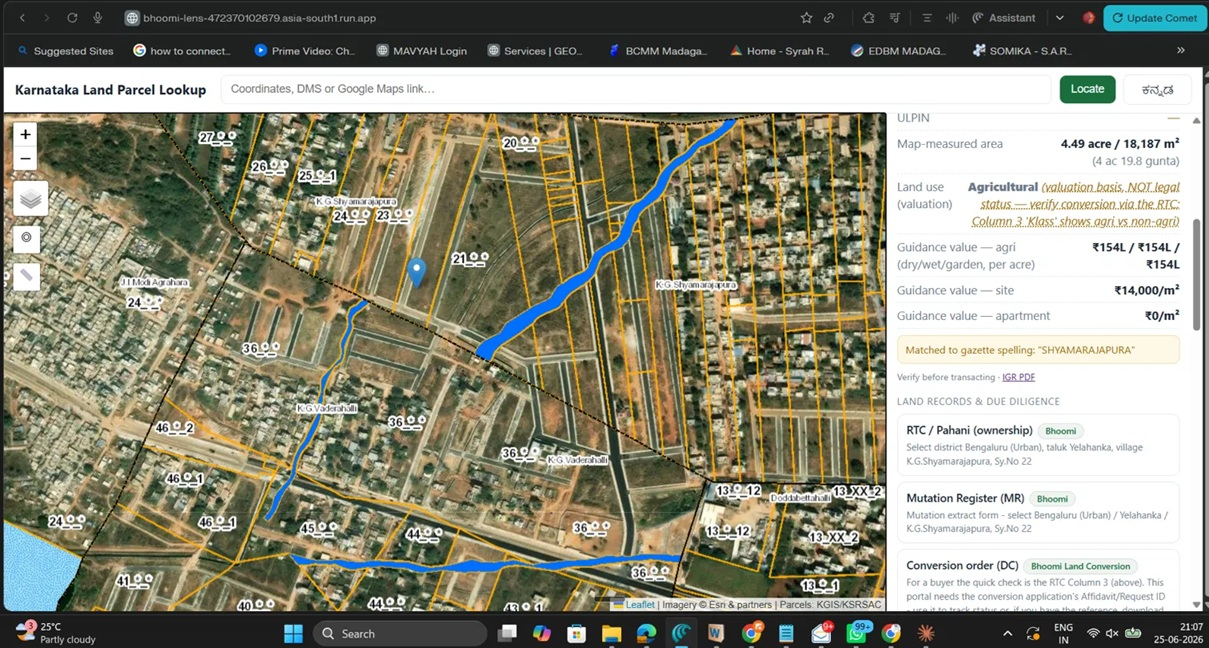
Bhoomi Lens turns a point on a map into a parcel’s full identity. Drop a pin anywhere in Karnataka — type coordinates, paste a Google Maps link, or just click the map — and in seconds you see the district, taluk, hobli and village (in English and Kannada), the survey number with its boundaries drawn on the map, the official guidance value, the land-use zone with indicative FSI and development controls, and the pincode and Sub-Registrar Office that govern it. Alongside all of that, you get direct links to the right government portal for every record that matters — RTC, mutation, encumbrance certificate, conversion order, survey sketch, property tax and litigation — each one pointed at the correct page so you’re not hunting through menus.
In short: the scattered first hour of Karnataka land due diligence, collapsed into a single screen.
The honesty principle — why you can trust what you see
Most property tools quietly fill in the blanks. When they don’t actually have a number, they estimate one, round one off, or pull a stale figure — and present it with the same confidence as a real one. That is precisely how buyers get misled.
Bhoomi Lens is built on the opposite rule: nothing is fabricated. Every value it shows is fetched from an official source and stamped with where it came from and when. And when a record can’t be read directly — because it sits behind a login or a captcha, like the RTC owner column or the encumbrance certificate — the tool says so plainly: “Not fetched — verify at source,” and hands you a direct link to the official portal rather than guessing.
It is just as careful with the difference between indicative and legal. The guidance-value gazette tells you how the Stamps Department values a parcel — a strong signal, but not the legal conversion status, so the tool labels it exactly that way and points you to the conversion order. The FSI and setback figures are shown as typical ranges, clearly marked “confirm with the sanctioned regulations,” because real FSI depends on the road width and plot in front of the authority.
This is the same principle our whole firm runs on — advise, don’t sell; verify before you trust — written into software. The tool’s job is to get you to the truth faster, never to be a substitute for it.
How to use it — in about two minutes
- Drop a pin. Paste coordinates or a Google Maps link, or click directly on the map where the land is.
- Read the identity. District, taluk, hobli, village, pincode and Sub-Registrar Office appear instantly. Zoom in and click inside a plot to see its survey number and boundary.
- Check value and zoning. See the official guidance value, the land-use zone (residential, commercial, agricultural, industrial…), and the indicative FSI and development controls for that zone.
- Pull the records. Use the direct links to open the official portals for RTC, EC, mutation and conversion — with the village and survey details already resolved, so you know exactly what to enter.
That’s it. What used to mean six browser tabs and a lot of guesswork is now a guided, in-order checklist.
What Bhoomi Lens is not
This part matters as much as the rest, so we’ll say it plainly: Bhoomi Lens is a starting point, not a substitute for verification.
It helps you find the right village, the right survey number, and the right portal — fast. It does not replace reading each record at its official source, and it does not replace a lawyer’s title check before you part with money. Indicative values are indicative. Zoning and FSI must be confirmed with the planning authority. Ownership, encumbrances and conversion must be confirmed on the government record and reviewed by a professional. Treat everything the tool shows as a well-organised first pass that tells you where to look and what to ask — then go and confirm it.
Stating those limits openly isn’t a weakness of the tool. It’s the whole point of it.
Why we’re sharing it
We built Bhoomi Lens because we kept watching good people make avoidable mistakes on Karnataka land — not for lack of care, but for lack of a clear place to start. We’d rather more buyers verify properly, even the ones who never become our clients. Safer land decisions across Karnataka is a goal worth giving something away for.
Try Bhoomi Lens → and run your next plot through it before your next site visit.
And if what you find raises questions — a mismatched survey number, an unclear conversion, a price that doesn’t match the guidance value — talk to an advisor → before you commit. That’s exactly the conversation worth having early.